
 Nguyễn Chính Ngọc Liên
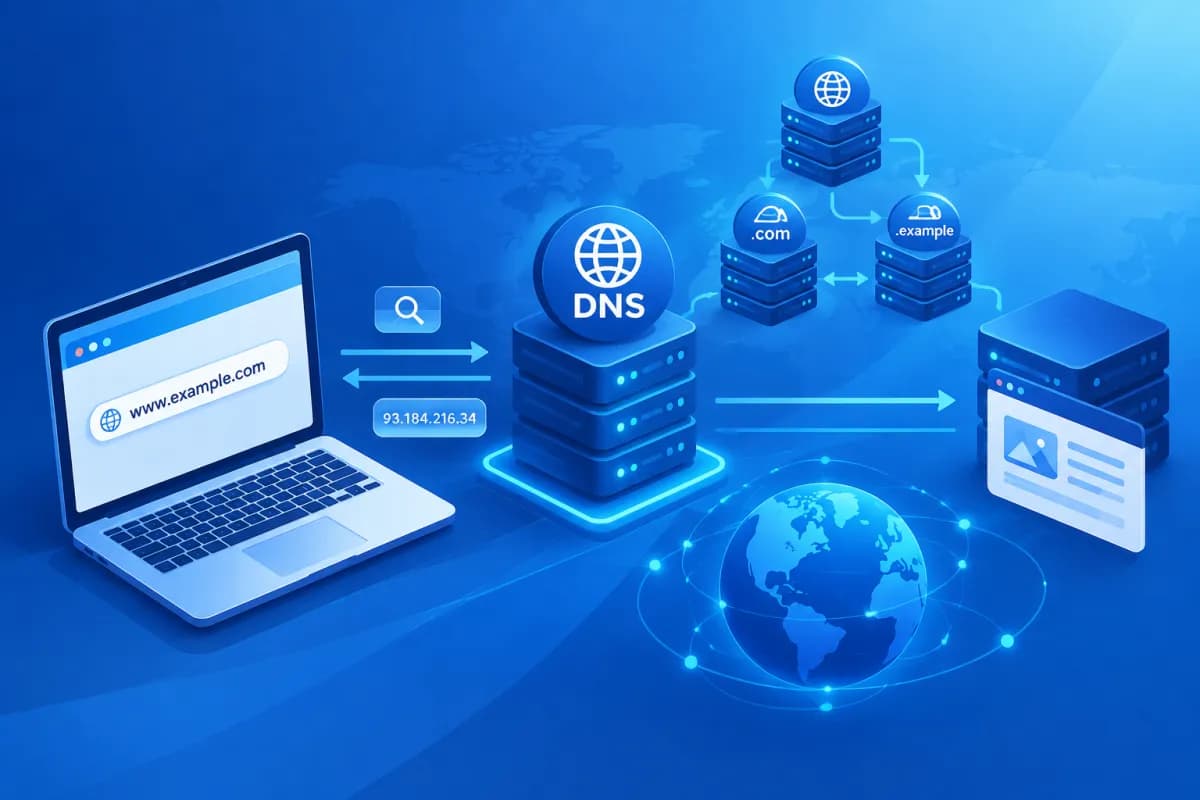
When you enter an address such as tenmien.vn in your browser, you don’t need to remember the long string of numbers that identifies the website’s server. The DNS system finds the corresponding IP address so your browser knows where to connect. This usually takes just a few seconds, but involves several steps and components working together.
So, what is DNS and how does DNS work to convert a domain name into an IP address? And what happens between the moment someone presses Enter and the website appears? Understanding this process helps businesses manage domains, configure websites, and troubleshoot access issues more effectively.
What Is DNS? Why Do Websites Need It?
DNS stands for Domain Name System. You can think of it as the Internet’s directory: people find websites using easy-to-remember domain names, while computers use IP addresses to locate the servers they need to connect to. DNS looks up the information that links these two types of addresses.
For example, you can remember a brand’s domain name instead of memorizing an IP address such as 203.0.113.10. When someone requests access, the DNS system finds the matching record and returns the IP address to the device. The browser then uses that address to connect to the website’s server.
DNS does more than help people open websites. It also supports email routing, verifies domain ownership, and provides information needed by some Internet services. This information is stored in different types of DNS records.
Domain names are usually organized in a hierarchical structure. For example, in blog.congty.vn, “.vn” is the top-level domain, “congty” is the second-level domain, and “blog” is a subdomain. This structure lets DNS divide management responsibilities and look up information at each level, rather than storing all Internet data in one place.
Key Components in the DNS Resolution Process
To understand how a DNS request works, it helps to identify the components typically involved. Each one handles a different step in finding the IP address for a domain name.

- User device: A computer or phone sends a lookup request when the browser needs to connect to a domain name.
- DNS resolver: A DNS resolution server, typically operated by an Internet service provider, a business, or a public DNS service. The resolver receives the request and finds the answer on the device’s behalf.
- Root DNS server: The highest-level server in the hierarchy. It directs the resolver to the server responsible for the relevant top-level domain.
- Top-level domain DNS server: This server manages information about extensions such as .vn, .com, or .org and points to the authoritative server for the domain being searched.
- Authoritative DNS server: This server stores a domain’s official records, such as its IP address or email server information.
The resolver can perform a recursive lookup: it takes responsibility for finding the complete answer and returning it to the device. Meanwhile, servers in the hierarchy typically respond by directing the resolver to the next level. Dividing responsibilities this way allows the system to handle vast numbers of requests around the world.
DNS caching also plays an important role. A device, browser, operating system, or resolver may store lookup results for a period of time. This means that subsequent visits don’t need to repeat the entire lookup process.
The Journey of a Website Access Request
When someone enters a domain name and presses Enter, the browser doesn’t immediately know the address of the website’s server. First, the device needs to check whether that information is already available. Here’s an overview of a DNS request when the result isn’t in the cache.

- Check stored data: The browser and operating system look for the domain information in their caches. If a valid record is available, the device can use the stored IP address immediately.
- Send a request to the resolver: If no result is found, the device sends a query to the DNS resolver configured on the network, such as the ISP’s resolver or a DNS service provider’s resolver.
- Find the server responsible for the domain: The resolver checks its cache. If it doesn’t have the answer, it queries DNS servers in the hierarchy in turn to find the authoritative server.
- Receive the required record: The authoritative DNS server returns the record that matches the requested domain. For an IPv4 address lookup, the result is usually an A record; for IPv6, it may be an AAAA record.
- Return the result to the device: The resolver sends the IP address back to the device and usually caches the result for the period specified in the record.
- Connect to the website: The browser uses the IP address to connect to the web server, requests the content, and displays the page to the user.
DNS only helps the device find the right destination; it isn’t the entire website-loading process. After DNS resolution, the browser still needs to establish the appropriate connection, send a request to the server, and receive resources such as page content, images, and code. So, a slow-loading website isn’t necessarily a DNS issue. The cause could also be the Internet connection, server, source code, or resource size.
Common DNS Record Types and the Role of Caching
DNS records are information configured for a domain name. Depending on their purpose, different record types direct the system to a service or provide different data. Businesses commonly encounter these types:
- A: Maps a domain name to the server’s IPv4 address.
- AAAA: Maps a domain name to an IPv6 address.
- CNAME: Creates an alias that points to another domain name, often used for subdomains or external services.
- MX: Specifies the server that receives email sent to the domain.
- TXT: Stores text used for purposes such as verifying domain ownership or setting email-sending policies.
- NS: Identifies the DNS servers responsible for managing a domain’s data.
Each record typically has a storage duration called TTL (Time to Live). TTL tells a resolver how long it can keep a result in its cache before looking it up again. A longer TTL can reduce the number of queries, while a shorter TTL allows changes to take effect sooner but may increase the number of DNS queries.
This explains why results don’t always update everywhere immediately after a server address is changed or a record is updated. Some resolvers may continue using old data until the TTL expires. When moving a website, businesses should plan record updates, check the configuration, and allow for the time it may take resolvers to refresh their data.
DNS Security and Troubleshooting Common Issues
DNS directly affects access to websites and email, so misconfiguration or tampering can disrupt operations. In some cases, users may be redirected to an unwanted address; a business could lose the ability to receive email or its website may point to the wrong server.

To reduce risk, businesses should protect domain management accounts with strong passwords and multi-factor authentication, limit DNS editing rights to authorized people, and back up configurations before making changes. Pay particular attention to MX, TXT, and service verification records: editing them incorrectly can affect email or platforms in use.
Measures and tools such as DNSSEC can help verify the integrity of DNS data when configured appropriately. However, DNSSEC does not replace protections for accounts, servers, and applications. Businesses should assess solutions against their actual infrastructure and carefully check compatibility before deployment.
If a website is inaccessible, check the following in order:
- Is the domain still active and has it been renewed?
- Do the A, AAAA, or CNAME records point to the correct server?
- Are the authoritative DNS servers configured correctly?
- Could a recent DNS change still be waiting for cached data to expire?
- Is the website or server working normally when checked directly using an appropriate method?
Checking each layer helps narrow down the cause instead of rushing to change multiple records at once. If the website has just moved to a new server, confirm the destination address with the service provider and save the current configuration so you can restore it if needed.
Conclusion: Understand DNS to Manage Your Website More Proactively
DNS is the system that resolves domain names, converting easy-to-remember names into IP addresses that devices can use to connect. A request typically passes through a resolver, the hierarchical DNS server system, and an authoritative server before the browser begins connecting to the website’s server. Caching speeds up lookups, but it can also mean DNS changes take time to update consistently.
For businesses, understanding what is DNS and how does DNS work and knowing the role of common records can help manage domains, email, and websites securely, while preventing issues during infrastructure changes. If you need advice on websites, digital systems, or organizing your online infrastructure to suit your needs, contact LilyTech to discuss your requirements and explore a practical solution for your business.

