
 Quinn Pham
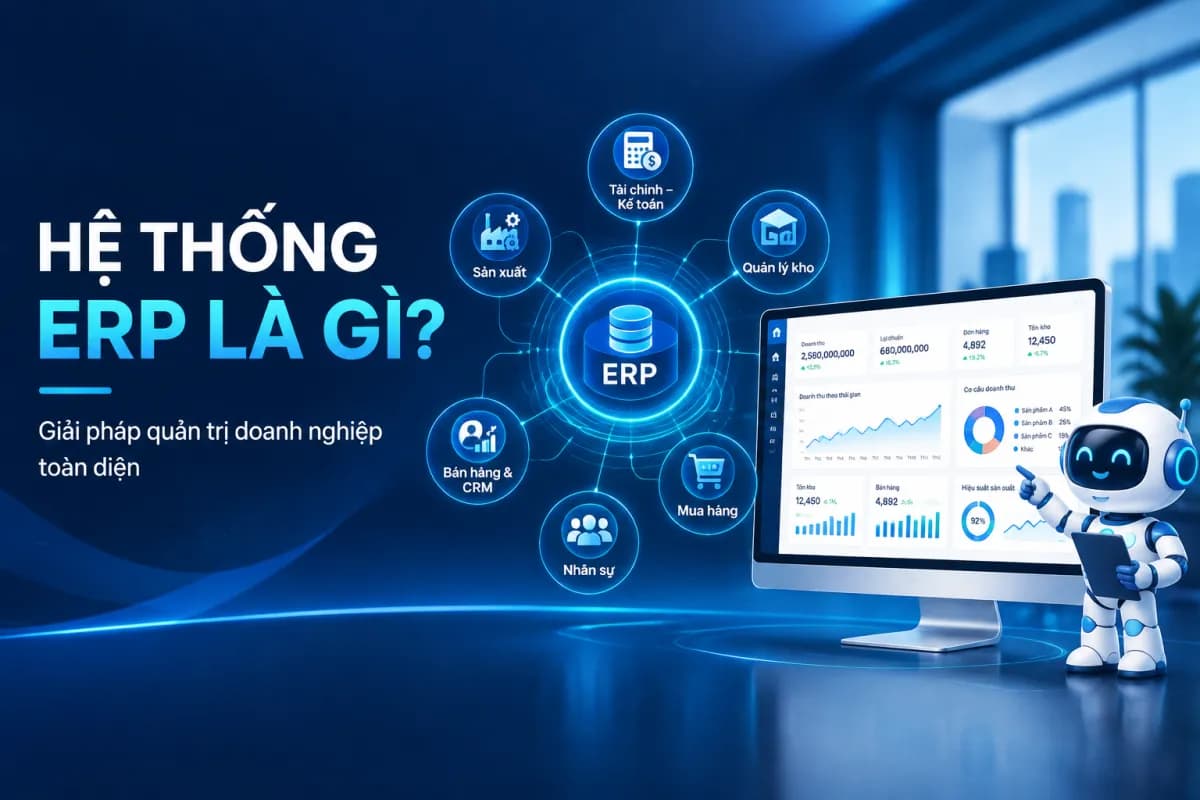
What is an ERP system? It is integrated software that helps businesses manage and automate core processes such as finance and accounting, human resources, inventory, purchasing, sales, and production using a unified database. An ERP system eliminates data silos between departments, improves consistency, and helps leaders make decisions based on up-to-date information.
What Is an ERP System, and Why Do Businesses Need One?
An ERP system is much more than an expanded accounting application. At its core, ERP is an integrated management platform that connects multiple departments and processes through a shared data system.

Definition and Core Principles of ERP
ERP stands for Enterprise Resource Planning. It is software designed to manage, connect, and automate an organization’s core business activities.
Instead of having each department use separate data files or software, ERP brings information together on one platform. When the sales team creates an order, the data can connect directly to inventory, accounts receivable, delivery, and revenue reporting. When the purchasing team enters raw materials, the information can be linked to inventory, production planning, and accounting.
The most important feature of ERP is its shared database. Data is entered once and updated consistently for departments with the appropriate access. This approach reduces duplicate data entry, limits discrepancies between reports, and creates a continuous flow of information.
ERP does not automatically solve every management problem. It delivers value only when a business defines its processes, sets clear access permissions, standardizes data, and assigns people to oversee system operations.
What Business Problems Does ERP Address?
Before implementing ERP, businesses often face fragmented data, delayed reports, extensive manual data entry, and difficulty determining which figures are accurate. Accounting may use one system, inventory may be tracked in spreadsheets, sales may use separate tools, and HR records may be stored elsewhere.
These data silos can lead to a range of problems:
A customer may appear under multiple names or ID numbers.
Inventory figures in reports may not match actual stock levels.
Revenue, receivables, and orders may need to be reconciled manually.
Leaders may spend too much time waiting for reports to be compiled.
An error in one department may affect related processes.
Employees may have to enter the same information repeatedly in different tools.
An ERP system creates a more connected workflow. For example, a sales order can update order status, inventory levels, delivery information, and customer receivables at the same time. This helps a business view operations as a continuous flow rather than as isolated departments. An ERP system brings these processes and data together in one place.
Which Businesses Should Consider Implementing ERP?
ERP is often a good fit for medium-sized and large businesses, particularly those with around 50 or more employees or complex supply chains. However, headcount is not the only criterion. The complexity of business operations and the need to connect data are also important.
Businesses that commonly have a clear need for ERP include:
Manufacturers: Need to manage bills of materials, production plans, schedules, and quality.
Retail chains: Need to synchronize inventory across stores, branches, and central warehouses.
Distribution companies: Need to track purchasing, inventory, orders, delivery, and receivables.
Service companies: Need to manage projects, human resources, and costs on one platform.
Growing businesses: Need a system that can support more departments, locations, or processes as they expand.
A small business with simple processes may not need to implement a full ERP system right away. If its current challenges are limited to a single business function, a specialized solution may be a better fit. By contrast, if the business already has to reconcile data across several systems, ERP is often worth considering.
How Is ERP Different from Standalone Management Software?
Standalone management software typically focuses on a single business function, such as accounting, sales, inventory, or HR. ERP covers multiple modules and brings them together in a shared data system.
For example, inventory management software may show how much stock is available. ERP can connect those quantities to purchase orders, sales orders, production plans, cost of goods, and financial reports. A CRM system may store customer engagement history, while ERP can link that history to orders, receivables, and revenue.
The difference is not the number of screens or advertised features, but the degree of process integration. When evaluating ERP, businesses should ask whether data is shared across departments, rather than checking each feature in isolation.
ERP Modules and How They Work Together
An ERP system typically consists of multiple modules. Each module supports a specific group of business functions, but the greatest value comes when they exchange data consistently.

Finance and Accounting
The finance and accounting module manages functions such as the general ledger, receivables and payables, tax reporting, and cash flow. It is often where the financial impact of purchasing, sales, production, and operating costs is consolidated.
When a transaction is recorded by the relevant department, the data can be transferred to accounting according to the configured workflow. This reduces duplicate entry and helps reconcile operational activity with financial figures.
Common management objectives for this module include:
Tracking accounts receivable and accounts payable.
Managing cash flow and financial transactions.
Supporting financial and tax reporting in line with the business’s processes.
Connecting revenue, expenses, and cost of goods to business activity.
Providing leaders with data that reflects the system’s update frequency.
ERP does not replace the accounting team’s responsibility for financial controls. Businesses still need to define accounting standards, approval workflows, and appropriate access permissions.
Supply Chain and Inventory Management
The supply chain management module, commonly known as SCM, tracks activities from purchasing and receiving through storage and distribution. It is particularly important for manufacturers, trading companies, and retailers.
Supply chain data may include supplier information, purchase requests, purchase orders, receiving records, inventory, and deliveries. When these steps are managed in a unified workflow, businesses can more easily determine where goods are, what quantities have been received, and which orders still need attention.
For retail chains, ERP supports inventory synchronization between branches and central warehouses. For manufacturers, inventory data informs materials planning. For distributors, stock information can help guide order allocation.
Human Resource Management
The human resource management module, or HRM, covers functions such as employee records, time and attendance, payroll, and performance reviews. When integrated with finance and project management, HRM can give businesses a clearer view of personnel costs.
A service company may need to know which employees are assigned to each project, how their time is allocated, and what personnel costs are associated with each project. If HR data is stored in a separate tool, consolidating these costs often requires manual work.
Commonly managed data includes:
Employee information and records.
Employment status and attendance.
Data used for payroll processing.
Performance results or evaluation criteria.
Relationships between employees, departments, and projects.
Businesses should pay particular attention to privacy and access permissions when implementing this module. Not every user should be able to view salary details or personal records.
Customer Relationship Management
The CRM module stores customer information, interaction histories, orders, and service activities. When CRM is connected to sales, inventory, and accounting, employees can get a more complete view of each customer instead of seeing only individual calls or orders.
For example, depending on their access permissions, sales staff can check purchase history, order status, receivables, and customer service information in one system. Leaders can also monitor the relationship between sales activities and revenue results.
CRM within ERP is a good fit for businesses looking to reduce the fragmentation of customer data across employees and tools. Its effectiveness still depends on staff keeping records complete and the business following consistent customer management rules.
Production Management and Bills of Materials
The production management module, often referred to as MRP, supports production planning, bill of materials management, progress tracking, and quality control. It is particularly valuable for factories and businesses with multi-stage production operations.
A bill of materials, or BOM, describes the components needed to manufacture a product. If the BOM is inaccurate, materials purchasing, costing, and production planning can all be affected.
A production workflow managed through ERP often connects:
Production requirements or orders.
The bill of materials.
Raw material inventory.
Purchasing plans.
Production orders and schedules.
Quality control.
Completion results and finished-goods quantities.
ERP does not determine the correct bill of materials for a business. Operational teams must review and standardize BOMs before entering them into the system.
Reference Table: ERP Modules and Data Flows
ERP modules should not be evaluated in isolation. The table below outlines the role, input data, output data, and types of businesses that commonly need each module.
Overview of Functions and Data
ERP module | Primary functions | Typical input data | Output data or connections | Businesses that commonly need it |
|---|---|---|---|---|
Finance and accounting | General ledger, receivables, tax reporting, cash flow | Purchasing and sales documents, expenses, payments | Financial reports, receivables, cash flow | Most medium-sized and large businesses |
Purchasing management | Purchase requests, supplier selection, and tracking | Goods and materials requirements, production plans | Purchase orders, receiving schedules, payables data | Manufacturing, distribution, and retail |
Inventory management | Receiving, shipping, stock tracking, and transfers | Receiving and shipping records, orders, production orders | Stock levels, goods history, operational alerts | Businesses with many products or locations |
Supply chain management | Coordinating purchasing, inventory, and distribution | Supply requirements, orders, inventory | Supply and distribution plans | Businesses with complex supply chains |
CRM | Customer history, orders, and service | Customer details, interactions, and needs | Transaction history, service status | Retail, distribution, and services |
HRM | Employee records, attendance, payroll, performance | Employee data, working hours | Timesheets, payroll data, evaluations | Businesses with a large workforce |
MRP | Production planning, BOMs, quality | Orders, bills of materials, raw material inventory | Production orders, materials requirements, results | Manufacturers |
Management reporting | Data consolidation and visualization | Data from multiple modules | Dashboards and up-to-date reports | Executives and department managers |
Example Data Flow: Sales to Accounting
An integrated sales workflow may begin when an employee creates a customer order. The system checks product and inventory information based on its configuration. The order can then move through delivery and inventory issue steps, with revenue recorded according to the business’s processes.
A basic data flow may include:
A sales employee creates or receives an order.
The system checks customer and product information.
The warehouse team confirms fulfillment capacity.
Goods are picked and delivered according to the process.
Receivables or payment are recorded.
Accounting uses the data for relevant reports.
Leaders review revenue, inventory, and receivables in consolidated reports.
This is only an illustrative model. Each business should design approval, validation, and accounting processes around its actual operations.
Example Data Flow in a Manufacturing Business
In manufacturing, an order or planning requirement may be the starting point. The system compares requirements with the BOM and raw material inventory, helping determine purchasing or material usage plans.
A typical connected workflow includes:
Production requirements.
The product’s BOM.
Raw material inventory checks.
Purchase requests, if needed.
Production orders.
Progress tracking.
Quality checks.
Receipt of finished goods and updates to related data.
If a business has not standardized item codes, units of measure, or BOMs, moving this workflow into ERP may expose a range of inconsistencies. This is why process discovery and data cleansing should take place before configuration.
How to Use the Module Table to Set Implementation Priorities
Not every business needs to implement every module at once. It can start with processes that cause the most errors or generate foundational data for other departments.
One way to prioritize is to assess three questions:
Which processes take the most time to enter and reconcile data?
Which data, if inaccurate, would affect multiple departments?
Which reports do leaders need but cannot currently access in time?
For example, a manufacturer might prioritize inventory, purchasing, MRP, and accounting. A retail chain might prioritize products, inventory, sales, and finance. A service company might focus on CRM, HR, projects, and costs.
ERP Implementation: A Step-by-Step Process
ERP implementation is a process transformation project, not just a software installation. Businesses need to move from discovery and design through configuration, testing, and operational support.

Step 1: Assess and Analyze the Current State
The first stage is about understanding how the business operates, where its data resides, and where bottlenecks occur. The implementation team should consult the departments that use the processes directly, not just the IT department.
The assessment should cover:
Current process maps.
The person responsible at each step.
Forms and data currently in use.
Approval rules.
Repeated data-entry points.
Reports that currently need to be compiled manually.
Issues involving product, customer, supplier, or employee codes.
Based on LilyTech’s experience, businesses tend to achieve better results when they clearly describe business problems before discussing features. Starting with a feature list can lead a project to focus on whether a particular screen exists while overlooking operational objectives.
Step 2: Design the Solution and Target Processes
Once the current state is understood, the business needs to design its desired processes in ERP. This is when it decides which steps to retain, remove, or automate, and which steps require approval.
Designing a solution does not mean copying every existing process into the software. ERP can help standardize operations, but migrating a process that has too many loops or unclear ownership will not deliver meaningful improvement.
Key details to align on include:
Roles and permissions for each user group.
The starting and ending points of each process.
Required data at each step.
Approval rules and exception handling.
Reports needed at each management level.
Which processes will use standard features and which require customization.
Step 3: Configure, Develop, and Standardize Data
At this stage, the system is set up according to the agreed design. The business may need to configure catalogs, roles, forms, approval workflows, and reports. Additional features may need to be developed to address industry-specific requirements.
Data is an important part of this phase. Catalogs such as product codes, customers, suppliers, units of measure, accounts, and employee records should be checked before migration to the new system.
Data entry should not be treated as a simple technical task. Duplicate records, missing standard codes, or inconsistent units of measure can undermine the accuracy of future transactions and reports. The business should appoint people to validate the data in their respective areas.
Step 4: Train End Users and Migrate Data
End users include sales, warehouse, accounting, HR, purchasing, and production employees. They should be trained using real-world scenarios rather than receiving only a general overview of the software.
An effective training program should be tailored to each role:
Warehouse staff practice receiving, shipping, and transferring goods.
Sales staff practice creating orders and checking their status.
Accounting staff review relevant transactions and reports.
HR staff manage employee records, attendance, or payroll data.
Managers review reports and approve transactions.
System administrators manage users and access permissions.
Data migration requires a clear plan that specifies which data will be moved, when data will be finalized, and how missing information will be handled. Not all historical data needs to go into the new system; the scope should reflect management needs and the ability to validate the data.
Step 5: UAT, Go-Live, and Post-Implementation Support
UAT, or user acceptance testing, is the stage when users check the system against real-world scenarios. The goal is not just to confirm that screens display correctly, but also to validate the complete business workflow and its outputs.
Businesses should prepare scenarios such as:
Creating an order and tracking it through to completion.
Receiving and shipping goods, then checking inventory.
Submitting a raw material purchase request.
Creating a production order and recording finished goods.
Checking receivables data or related reports.
Editing or canceling a transaction according to user permissions.
After UAT, the business can officially begin using the system, a milestone known as go-live. Post-go-live support should monitor errors, user questions, unusual data, and requests for adjustments. ERP is a long-term operational system that requires ongoing maintenance, updates, and improvement.
Practical Lessons and Mistakes to Avoid
ERP implementations often fail not because they lack features, but because objectives are unclear, data is not ready, and users are not meaningfully involved. Businesses should treat the project as an operational standardization initiative.
Mistake: Treating ERP as a One-Time Fix
ERP is not software that can be installed and then left unchanged. As a business grows, its processes, roles, and reporting needs may change. The system needs to be adjusted in a controlled way to remain fit for purpose.
A project may be technically complete but still fail to deliver business value if employees continue using spreadsheets outside the system, data is not kept up to date, or departments maintain separate processes.
Businesses should define operational indicators to monitor after implementation:
Are employees actually entering data in the system?
Are reports being used in meetings and decision-making?
Have manual reconciliation steps decreased?
Is data more consistent across departments?
Are the new processes being followed?
Mistake: Over-Customizing from the Start
Customization can make ERP a better fit for a business, but excessive customization can make the system complex, difficult to maintain, and hard to upgrade. Businesses should distinguish essential requirements from longstanding habits.
Consider each request by asking:
Does it meet an essential business or legal requirement?
Can it be handled through existing configuration?
What is the actual risk of not customizing?
Will many users need this feature, or does it serve a rare case?
Who will maintain and test it in the future?
Based on LilyTech’s experience, businesses should prioritize standard processes and develop additional features only when they deliver real value or are essential to operations.
Mistake: Overlooking Data Quality and Catalog Codes
Poor-quality data undermines trust in the entire ERP system. A product with multiple codes, duplicate customer names, or inconsistent units of measure can lead to inaccurate inventory and reports.
Businesses should establish rules for:
Product coding.
Customer and supplier classification.
Units of measure and conversions.
Catalog item status.
Who is authorized to create or edit master data.
How data is checked before it is used.
Master data must continue to be managed after go-live. If every department can create new codes freely, data fragmentation can return even after ERP implementation.
Example: Managing BOMs in a Manufacturing Business
A manufacturer may find that its material purchasing plans do not match actual needs because bills of materials are stored in multiple spreadsheets. When a BOM changes, not every department may update its records at the same time.
ERP can bring BOMs into a unified data source and link them to production planning, inventory, and purchasing. However, the business still needs to determine who approves a BOM, when it takes effect, and how changes are versioned.
In this case, the system’s value is not just in storing BOMs. It also creates a clear chain of responsibility from material specifications through materials, production, and finished goods.
Example: Synchronizing Inventory Across a Retail Chain
A retail chain with multiple branches may struggle to know exactly which store holds each item if every location records data differently. Stock transfers and end-of-period inventory consolidation can also be delayed.
ERP brings store, central warehouse, receipt, shipment, and transfer information into one shared system. Employees can follow the same data rules, while managers can view consolidated figures for locations within their access permissions.
To achieve this, the business needs consistent product codes and clear rules for recording damaged goods, returns, goods in transit, and data cut-off times.
ERP Selection Advice for Different Business Scenarios
There is no single ERP model that is ideal for every business. The scope of implementation should be based on processes, operational complexity, and the organization’s ability to manage change.
Manufacturing Businesses
Manufacturers should prioritize connections between planning, BOMs, raw materials, purchasing, inventory, production orders, and quality. If they implement only accounting without addressing production inputs, they may still have to plan outside the system.
Questions to clarify include:
Where are BOMs currently managed?
How many levels of materials are there?
Is raw material inventory updated promptly?
Who approves changes to material specifications?
How will plans be reconciled with actual output?
At which stage is quality recorded?
The initial scope may focus on master data, inventory, purchasing, and MRP, then expand as users become ready.
Retail Chains and Distribution Businesses
Retail chains need to focus on multi-location inventory, transfers, orders, purchasing, and distribution. The system should help the business see the connections between stores, central warehouses, and the transactions taking place.
Businesses should standardize:
Product codes shared across stores.
Receiving and shipping procedures.
Stock transfer workflows.
How returns and damaged goods are recorded.
Permissions for viewing branch data.
Reconciliation between sales and inventory.
For distribution businesses, CRM and receivables are often important as well, since orders are tied to customer history, payment terms, and delivery capacity.
Service Companies and Project Management
Service companies may not face the same complex inventory challenges as manufacturers, but they do need to manage time, personnel, revenue, and costs by project. As a result, CRM, HRM, finance and accounting, and project management may need to be connected.
Businesses should determine:
What code and owner are assigned to each project?
How do employees allocate their time to projects?
How are personnel costs linked to projects?
Are revenue and receivables tracked by contract or project?
Which reports help managers see how a project is using resources?
ERP can provide service companies with a shared platform for tracking business activity and personnel costs instead of consolidating data from multiple spreadsheets.
Businesses with 50 or More Employees
As headcount grows, complexity around permissions, reporting, and cross-department collaboration grows too. Businesses with around 50 or more employees should generally assess their integration needs carefully, especially if they have multiple functional teams or locations.
However, headcount alone does not prove that a business needs ERP right away. Businesses should also consider:
How many processes span multiple departments?
How often do reports need to be compiled manually?
Is data spread across multiple tools?
Do data discrepancies affect decision-making?
Are leaders prepared to participate in and drive change?
Businesses Not Ready for a Full Implementation
If processes are unstable, data has not been standardized, or leaders have not agreed on the objectives, a full ERP implementation may introduce risk. The business can start by mapping its processes, standardizing catalogs, and identifying important reports.
A cautious rollout could include:
Identify the main bottlenecks.
Standardize foundational data.
Select a connected group of processes.
Test with a representative user group.
Measure adoption and data quality.
Expand when the organization is ready.
A phased approach lets a business learn from experience instead of trying to change everything at once.
Related Topics to Understand When Exploring ERP
ERP is connected to a range of management and technology concepts. Understanding these relationships helps businesses assess the right scope instead of viewing ERP as simply a feature-rich application.
How Are ERP, CRM, and SCM Related?
CRM focuses on customers and sales interactions. SCM focuses on purchasing, inventory, and distribution. ERP is a broader platform that can include or connect these functions with finance, HR, and production.
A single order may involve all three areas:
CRM stores customer records, interaction history, and sales opportunities.
SCM checks products, inventory, and delivery.
ERP or its finance module records revenue, receivables, and reports.
Businesses do not necessarily need to replace every existing system with a single ERP solution. What matters is identifying which data needs to be synchronized and which system is the official source for each business function.
ERP and Digital Transformation
Digital transformation is more than moving paper forms into software. With ERP, businesses need to review how data is created, approved, used, and reported.
An ERP project can support digital transformation when a business:
Standardizes processes before digitizing them.
Reduces duplicate data entry.
Brings data together on a unified platform.
Uses up-to-date reports to inform decisions.
Defines clear access permissions and accountability.
Tracks the results of changes after go-live.
If a business simply transfers manual processes into the system without changing them, the result may be an electronic workflow that is still slow and complex.
Cloud ERP and On-Premises ERP
ERP systems are increasingly moving to the cloud, or SaaS, model. Users can access the system remotely through a web browser or mobile device, while the business may reduce its need to invest in physical server infrastructure.
On-premises ERP may still suit businesses with specialized operational requirements or a preference for direct control of their system environment. The choice should reflect security needs, management capabilities, remote access requirements, and available technical resources.
Businesses should not assume that cloud is always better or that on-premises systems are always more secure. They need to assess processes, access permissions, data governance, and the availability of long-term support.
Master Data and Access Management
Master data is foundational information used across multiple processes, such as product codes, customers, suppliers, employees, and units of measure. If master data is inconsistent, ERP modules cannot produce reliable reports.
Access permissions should also be designed around user roles. Warehouse staff do not necessarily need to see salary information, and sales staff may need to check order status without being allowed to edit financial data.
Good governance typically includes:
Creating roles based on job responsibilities.
Limiting permissions to view, create, edit, and approve information.
Assigning ownership of master data.
Reviewing permissions when employees change roles.
Monitoring important user actions.
Real-Time Reporting and Decision Quality
ERP can provide dashboards and up-to-date reports, but reports are useful only when input data is complete and processes are followed. “Real time” does not mean every figure is accurate if employees have not recorded transactions or data is still awaiting approval.
Businesses should design reports around the decisions they need to make:
Inventory managers need to know stock levels and related transactions.
Purchasing managers need to track requirements, purchase orders, and delivery schedules.
Leaders need visibility into revenue, cash flow, receivables, and key operations.
Production managers need to track materials, progress, and quality.
A report with a few accurate, up-to-date metrics may be more useful than a dashboard full of charts but lacking reliable data.
ERP Trends and Metrics to Track
Current ERP trends focus on flexible access, data integration, and faster decision support. However, technology creates value only when it is supported by standardized processes and consistent user adoption.
The Shift to Cloud Models
Cloud ERP allows users to access the system through a web browser or mobile device. It is a good fit for businesses with employees at multiple locations, branch networks, or a need to view data remotely.
Practical benefits may include:
Reducing the need for on-site physical servers.
Supporting access from multiple locations.
Enabling centralized data updates.
Helping teams work on the same platform.
Regardless of the model used, businesses still need to define access permissions, data-handling practices, and user responsibilities.
Process Automation and Less Manual Data Entry
An important goal of ERP is to reduce manual data entry through integrated workflows. When information is entered once and updated for relevant departments, employees can spend less time repeating tasks and more time checking data, handling exceptions, or serving customers.
Businesses should track signs of improvement such as:
The number of times the same data is entered.
Time spent compiling reports.
The number of reconciliation steps between departments.
The number of transactions that need correction due to inaccurate information.
The proportion of processes completed in the system.
Automation should not be measured by the number of features alone. Its value lies in whether processes become faster, accountability clearer, and discrepancies less common.
Dashboards for Data-Driven Decisions
ERP helps leaders move from waiting for manually compiled reports to monitoring more up-to-date information. Dashboards can consolidate data from finance, sales, inventory, HR, or production, subject to access permissions.
To make dashboards useful, businesses need to determine:
Who will use them?
Which decisions should they support?
Which modules will supply the data?
How often will the data be updated?
Which metrics need alerts or trend monitoring?
Who is responsible for investigating unusual figures?
Dashboards do not replace business analysis. They help identify issues sooner, but managers still need to investigate the causes and context.
Success Depends on People and Leadership
ERP is an organizational change initiative. According to LilyTech’s professional data, leadership commitment and employees’ ability to adapt account for around 70% of ERP project success.
This figure highlights that technology is not the only factor. Leaders need to align on objectives, resolve conflicts between departments, and require teams to use shared data. Employees need training, time to adapt, and support when problems arise.
Businesses should prepare a change management plan that includes:
Clearly explaining why the system is being implemented.
Selecting key users in each department.
Providing role-based training.
Setting up channels for reporting and resolving issues.
Collecting feedback after go-live.
Adjusting processes based on real-world data.
Conclusion: Principles for Successful ERP Implementation
An ERP system creates value when it connects data, people, and processes on a unified platform. Businesses should implement ERP to meet specific operational objectives, starting with real needs rather than chasing a long list of features.
Five Principles to Remember
First, standardize processes before moving them into software. ERP is not a silver bullet that can automatically fix an unclear process.
Second, identify the official source of data for each business function. If departments continue to use different versions of data, reports will remain inconsistent.
Third, implement ERP in priority-based phases. Depending on their bottlenecks and management objectives, businesses can start with finance and accounting, inventory, CRM, HRM, or MRP.
Fourth, treat end users as part of the project. They need to take part in discovery, testing, training, and post-launch feedback.
Fifth, evaluate the project by its business and operational outcomes, not simply by whether the software has been installed. Are reports faster? Is data more synchronized? Has data entry decreased? Are decisions based on more reliable information? These are important questions.
Pre-Implementation Checklist
Before selecting or implementing ERP, businesses should be able to answer these questions:
What is the project’s primary objective?
Which processes currently cause the most cost or errors?
Which departments need to share data?
Is current data duplicated or poorly standardized?
Who has the final say on process decisions?
Which users will take part in UAT?
Which modules are in the initial scope?
What reports does the business need to make decisions?
What training and post-go-live support will be provided?
Are leaders committed to using a shared system?
When Should You Seek Implementation Consulting?
Businesses should consider working with a consulting firm when multiple departments are involved, production or supply chain processes are complex, data is fragmented, or the internal team lacks experience managing ERP projects.
The right consulting partner should help the business assess its needs and design a solution around its operations, not just present a list of features. When selecting a partner, clarify the scope, data responsibilities, testing process, training, and post-implementation support. LilyTech’s website, lilytech.com.vn, can be a useful resource for businesses researching ERP solutions and suitable implementation approaches.
In Brief
In one sentence: ERP is integrated software that helps businesses manage core resources and processes using a unified database.
ERP is most suitable when a business needs to connect finance, inventory, purchasing, sales, HR, production, or customer service. Success depends more on standardized processes, clean data, user training, and leadership commitment than on having a large number of features.
Frequently Asked Questions
What Is an ERP System in Simple Terms?
An ERP system is a software platform that helps multiple departments manage and use consistent data. Instead of accounting, inventory, sales, HR, and production working with separate files or tools, ERP connects their functions in one system. When a transaction occurs, data can be updated for relevant departments according to the designed workflow. The main goals are to reduce duplicate data entry, limit discrepancies, and give leaders more complete reports to support decision-making.
What Modules Does ERP Include?
Core ERP modules commonly include finance and accounting, supply chain management, inventory management, human resource management, CRM, and production management. Businesses can implement selected modules first and expand later, depending on their needs. Finance and accounting tracks the general ledger, receivables, taxes, and cash flow. SCM connects purchasing, inventory, and distribution. HRM manages employee records, attendance, payroll, and performance. CRM manages customer relationships, while MRP supports production planning, BOMs, and quality.
Do Small Businesses Need to Implement ERP?
Small businesses do not always need to implement a full ERP system immediately. The decision should be based on process complexity, the number of departments, data integration needs, and growth rate. If the business has only one simple function to manage, specialized software may be a better fit. On the other hand, if data is fragmented, reports must be compiled manually, inventory is difficult to control, or the business has a complex supply chain, ERP can help standardize and connect operations.
How Is ERP Different from Accounting Software?
Accounting software mainly focuses on recording, processing, and reporting financial transactions. ERP has a broader scope, combining accounting with modules such as sales, inventory, purchasing, HR, CRM, and production. The key difference is that ERP connects data across departments. For example, a sales order can be linked to inventory, delivery, receivables, and revenue. ERP is therefore more than accounting software with a few extra features; it is an integrated management system.
How Long Does ERP Implementation Take?
ERP implementation time depends on the scope of the modules, process complexity, data quality, level of customization, and user participation. There is no single fixed timeframe for every business. A typical process includes discovery, design, configuration, additional development, training, data migration, UAT, go-live, and post-implementation support. Businesses with multiple locations, complex manufacturing operations, or unstandardized data typically need more preparation before going live.
What Factors Determine ERP Project Success?
Three important factors are processes, data, and people. Businesses need to standardize processes before configuring the system, clean master data, and clearly define each department’s responsibilities. End users must receive role-based training and take part in testing real-world scenarios. Leaders need to commit to shared data, resolve conflicts, and drive change. According to LilyTech’s professional data, leadership and employees’ ability to adapt can account for around 70% of project success.
Is Cloud ERP Suitable for Businesses Today?
Cloud ERP can suit businesses that need remote access through a web browser or mobile device and want to reduce investment in physical servers. It is particularly useful for businesses with multiple branches or employees working in different locations. However, the choice between cloud ERP and an on-premises system should reflect security requirements, data management, access permissions, and long-term support capabilities. The technology model cannot replace process standardization and user governance.